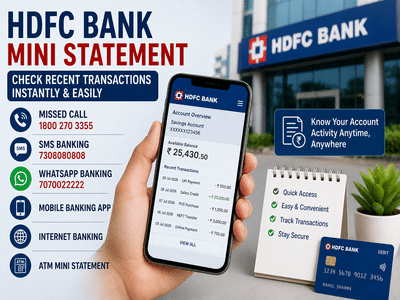
Keeping track of your bank transactions has become easier than ever with digital banking services. HDFC Bank customers no longer need to visit a branch or update their passbook to check recent account activity. Whether you want to verify a payment, monitor your balance, or detect unauthorized transactions, the HDFC Bank Mini Statement facility offers multiple quick and convenient options.
Customers can access their latest account transactions through missed call banking, SMS banking, WhatsApp Banking, the HDFC Mobile Banking App, Internet Banking, and ATMs. Here's a complete guide on how each method works.
What Is an HDFC Bank Mini Statement?An HDFC Bank Mini Statement is a summary of your most recent account transactions. It displays the latest debit and credit entries, allowing account holders to review recent banking activity without generating a full account statement.
This feature is especially useful for customers who want to verify recent payments or quickly monitor account activity while on the move.
Ways to Get an HDFC Bank Mini StatementHDFC Bank provides several convenient channels for accessing your recent transaction details, allowing customers to choose the method that suits them best.
1. Get Your Mini Statement Through Missed Call BankingOne of the fastest methods is using HDFC Bank's missed call banking service.
Steps:
-
Call 1800 270 3355 from your registered mobile number.
-
The call will disconnect automatically after a few rings.
-
You will receive an SMS containing details of your recent account transactions.
This service is available 24 hours a day and does not require internet access. It works only if the call is made from the mobile number registered with the bank.
2. Access Your Mini Statement Through SMS BankingCustomers can also use SMS Banking to obtain account information.
Before using this service, SMS Banking must be activated.
Registration process:
-
Type REGISTER
-
Send it to 7308080808
Once registration is completed successfully, customers can use eligible SMS Banking services, including account-related inquiries and transaction details, according to the bank's supported commands and services.
3. Check Transactions Through WhatsApp BankingHDFC Bank also offers banking assistance through WhatsApp.
How to use it:
-
Open WhatsApp using your registered mobile number.
-
Send Hi to 7070022222.
-
Follow the automated instructions displayed in the chat.
-
Select the relevant banking option to access your account information.
WhatsApp Banking provides a simple and convenient way to perform basic banking tasks without visiting a branch.
4. View Your Mini Statement Using the HDFC Mobile Banking AppCustomers who use the official HDFC Mobile Banking App can easily review recent account activity.
Steps:
-
Log in to the HDFC Mobile Banking App.
-
Open the Account Summary section.
-
Select Statement or the relevant account details option.
-
View your recent transactions.
-
If required, choose a custom date range to generate a detailed account statement.
The mobile application also provides additional banking services, including fund transfers, bill payments, and account management.
5. Check Transactions Through Internet BankingHDFC NetBanking also allows customers to access their account statements online.
Steps:
-
Visit the HDFC NetBanking portal.
-
Sign in using your Customer ID and Password.
-
Navigate to the Accounts section.
-
Choose Account Statement.
-
Select the desired account and date range to view transaction history.
This method is useful for customers who need more detailed account information than a standard mini statement.
6. Get a Printed Mini Statement from an ATMCustomers who prefer a printed record can use any eligible HDFC Bank ATM.
Procedure:
-
Insert your HDFC Debit Card.
-
Enter your ATM PIN.
-
Select the Mini Statement option.
-
The ATM will print a receipt showing your recent transactions.
Printed mini statements are useful when you need a physical copy for quick reference.
Benefits of Using the HDFC Mini Statement ServiceUsing the mini statement facility offers several practical advantages.
Some of the key benefits include:
-
Instant access to recent account transactions.
-
Easier monitoring of daily banking activity.
-
Faster identification of unauthorized or suspicious transactions.
-
Reduced need to visit a bank branch.
-
Multiple access channels, including missed calls, SMS, WhatsApp, mobile banking, internet banking, and ATMs.
-
Convenient account monitoring anytime and from almost anywhere.
If SMS Banking is not already activated on your account, you can register by following the bank's registration process.
Send the following message:
REGISTER
to 7308080808.
After successful registration, eligible SMS Banking services become available on your registered mobile number.
Final ThoughtsHDFC Bank's Mini Statement facility provides customers with a quick and convenient way to monitor recent account activity through multiple digital and offline channels. Whether you prefer using a missed call, SMS, WhatsApp, mobile banking, internet banking, or an ATM, the service helps you stay informed about your account without visiting a branch.
Regularly reviewing your transactions is also an effective way to detect unauthorized activity early and maintain better control over your finances.
Note: Banking services, registration requirements, mobile numbers, and available features may change over time. Customers should verify the latest information through HDFC Bank's official communication channels before using any banking service.
-
England’s troubled history with quarter-finals ends – but a win over Norway would chart new territory

-
Harry Kane Recalls 'Surreal' Golf Round With Donald Trump Ahead Of England's World Cup Quarter-final Against Norway

-
'Some Rallies Never End': Sachin Tendulkar's Heartfelt Tribute To Roger Federer After Wimbledon Reunion

-
OpenAI's CEO Of Applications Fidji Simo To Step Down Amid Health Struggles

-
Why Norway’s Football Team Is Suddenly Thriving: John Arne Riise Reveals the Secret Behind Their Rise