
There are many useful features available in WhatsApp, do you know that there is a feature provided in the app with the help of which you can easily hide your private chats? There will be many users who are aware of this feature, but there are still many people who are still unaware of this feature. If your girlfriend or wife checks your phone and you want to hide any of your private chats, then for this you just have to follow a small simple trick.
In the app you will get a feature called WhatsApp Chat Lock, the function of this feature is to lock your private chat. If you are away from your phone then no one will be able to open this locked chat even with your phone's password. Let us know how you can use this feature and how you can set a secret code for your private locked chat.
How to Hide WhatsApp Chat?
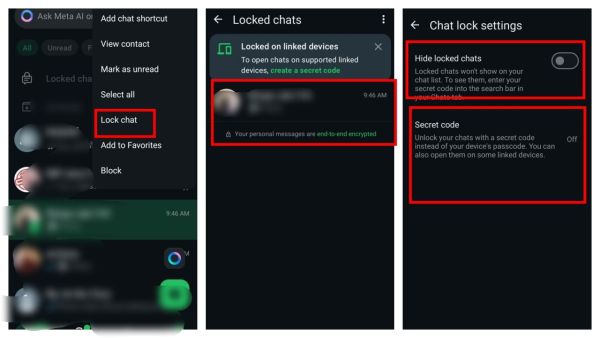
If a private chat is visible in the chat list of WhatsApp which you want to hide, then you will have to long press the chat on which you want to lock. After long press, you will have to tap on the three dot menu icon on the ride side at the top.
After clicking on the three dot icon, you will have to click on the Lock Chat option, after tapping on this option you will be asked whether you are confirmed. If you have installed fingerprint lock or PIN on your phone, then you will have to confirm it by entering the fingerprint sensor or PIN.
(Photo credit- WhatsApp)
As soon as you confirm, the chat will go directly to the locked chat folder which can be opened with your phone's PIN or your fingerprint sensor. But if someone knows the PIN or pattern of your phone, then you can create a secret code for the locked chat, without entering this secret code no one will be able to open your folder.
(Photo credit- WhatsApp)
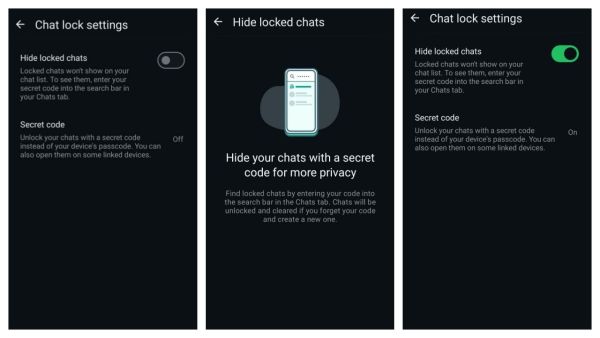
Apart from creating a secret code, if you want the locked chat folder to also disappear from the chat list, then you can also hide this folder. After the folder and chat are hidden, to find the locked chat, you will have to enter your secret code in the search, as soon as you enter the code, you will start seeing the folder of locked chat.
-
Ghana Officially Names 2026 World Cup Squad – Carlos Queiroz Blends Young Talents with Experienced Veterans
-
No Half Measures: Indonesia National Team Set Target to Win 2026 AFF Cup
-
Saudi Arabia National Team Squad for 2026 World Cup: Salem Al-Dawsari and Firas Al-Buraikan to Lead the Charge

-
Sriwijaya FC Legend Ferry Rotinsulu Saddened as His Favourite Team Italy Fails to Qualify for the 2026 World Cup

-
Minor girl dies by suicide in Hyderabad, note reveals details