
Anyone with a Gmail account might want to spend a few seconds making some changes. An "important" alert has just been shared with millions of users, and it's especially significant for those uneasy about AI scanning their emails. The latest warning comes from American TV personality and entrepreneur Lori Greiner. The Shark Tank star posted on Instagram over the weekend, urging people to pay attention. "Important information if you have a Gmail account," Greiner said. "Please share with friends and family to help protect them too! Stay alert. Stay safe."
So what's behind the concern-and what settings should you consider switching off?
The warning relates to Google's AI-powered features, which are fully capable of analysing inbox content to enable features such as smarter search, suggested replies, and email summaries. While Google maintains it doesn't read emails for its own purposes, Greiner has voiced scepticism.
"If you have a Gmail account, do not ignore this warning," she said, claiming that AI is scanning everything from financial documents to personal conversations-without users fully realising it.
"Google doesn't want you to know this, but they've been allowing AI to scan every single one of your emails, and I'm talking about everything.
"Your financial documents, your tax information, your personal conversations. All of it is being scanned by AI, without you even knowing."
If that sounds worrying, there's a simple fix and it only takes a few seconds.
Greiner points out that these features can be disabled quickly.
"Here's the good news," Greiner added. "You can turn it off in 30 seconds."
Here's how you can opt out of AI in Gmail
• Open Settings (via the cog icon in the top right of Gmail) and select "See all settings"
• Scroll to "Smart features"
• Turn off smart features in Gmail, Chat, and Meet
• Then select "Manage Workspace Smart Features" and uncheck additional boxes to further limit data use
According to Google, user privacy remains protected. The company says its AI system, Gemini, does not train on personal emails and only processes data temporarily to complete specific tasks like summarising messages.
"Gemini in Gmail does not retain your data... it only processes what you ask for, then leaves your inbox," Google explains, emphasising that your emails remain private.
Still, if you're uncomfortable with AI interacting with your inbox at all, turning off those smart features is a straightforward way to limit it.
-
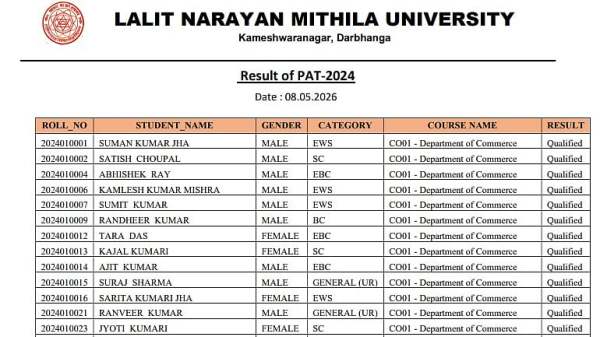
LNMU PAT 2024 Results Released At lnmu.ac.in; Candidates Can Check Roll Numbers In PDF
-
Atif Aslam Karachi Concert Disrupted As Female Fan Jumps On Stage, Refuses To Leave After Selfie Attempts; Security Intervenes

-
Tess Daly 'completely broken' days after marrying Vernon Kay 'I fell apart'

-
Punjab CM Accuses BJP of Misusing ED in Ongoing Raids

-
Suvendu Adhikari Sworn in as West Bengal's New Chief Minister