
Back in October, WhatsApp introduced backgrounds, effects, and filters for video calls. These add-ons are available for 1:1 as well as group calls. Initially rolled out for a small set of users, these call effects are now reaching a larger audience. You can use these tools to change the background of your WhatsApp video calls or add fun and dynamic effects to them. Here’s how you can access them.
Filters, Effects, and Backgrounds on WhatsApp Calls
Call filters, effects, and backgrounds make video conversations more engaging. Some of the video call effects and filters on WhatsApp are inspired by Snapchat. These fun and whimsical add-ons make video calling more fun. Call backgrounds serve a more utilitarian purpose and they let you conceal your surroundings.
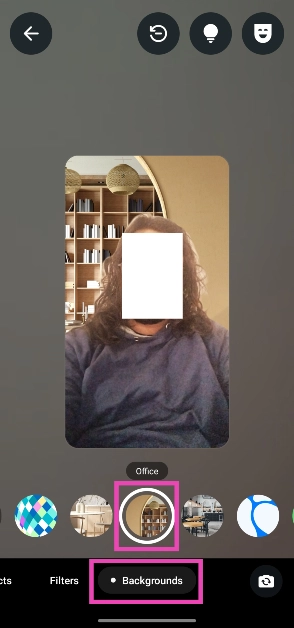
Here are the background options offered by WhatsApp:
- Blur
- Living room
- Office
- Cafe
- Pebbles
- Foodie
- Smoosh
- Beach
- Sunset
- Celebration
- Forest
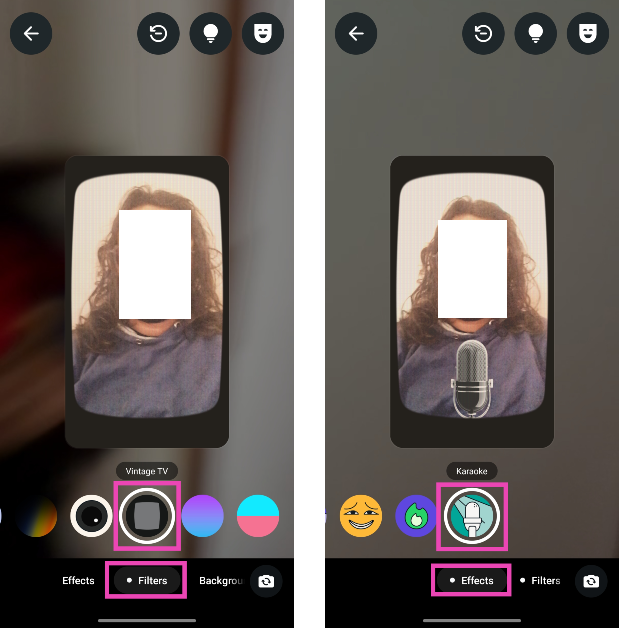
Here are the filters you can apply to your video calls:
- Warm
- Cool
- Black & White
- Light leak
- Dreamy
- Prism light
- Fisheye
- Vintage TV
- Frosted glass
- Duotone
Change call background on WhatsApp
Step 1: Launch WhatsApp Messenger on your smartphone and make a call.
Step 2: Hit the wand icon on your camera feed.
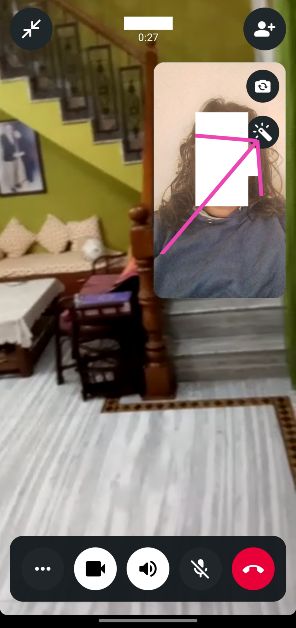
Step 3: Switch to the Backgrounds tab and select a background from the list.
Step 4: Similarly, switch to the Filters or Effects tab to add more highlights to your video feed.
Step 5: Hit Back when you’re done.
Frequently Asked Questions (FAQs)
Does WhatsApp have call backgrounds?
WhatsApp introduced call backgrounds, filters, and effects in October 2024. OEMs like Samsung offer special video effects of their own.
How do I change my WhatsApp call background?
Make a call on WhatsApp, tap the wand icon on your video box, switch to the Backgrounds tab, and pick a background.
How to hide the call background in WhatsApp calls?
Go to the background tab in video call options and select blur to hide the background.
How do I set a custom background for WhatsApp calls?
To set a custom image as their WhatsApp call background, Samsung users can go to Settings>Advanced features>Video call effects>Background>Image.
Final Thoughts
This is how you can set or change the background, filter, or effect on WhatsApp calls. You can also use the options in the top menu to improve the picture quality in low light and add beauty effects while on a call. If you have any other questions, let us know in the comments!
-
Himachal Panchayat Polls See Over 78% Voting, Women Outnumber Men At Booths

-
Trump Says Health Check Was ‘Perfect’ Amid Questions Over Visible Health Concerns

-
UK Records Hottest May Day Ever As London Temperature Hits 35°C
-
Advocate Files Complaint Against Mamata Banerjee Over Alleged Anti-Sanatan Remarks

-
Unity Cup 2026: Blue Tigers Return To England After 24 Years, Set For Jamaica Semi-Final Challenge