How to send 'view once' media files via WhatsApp
30 Nov 2024
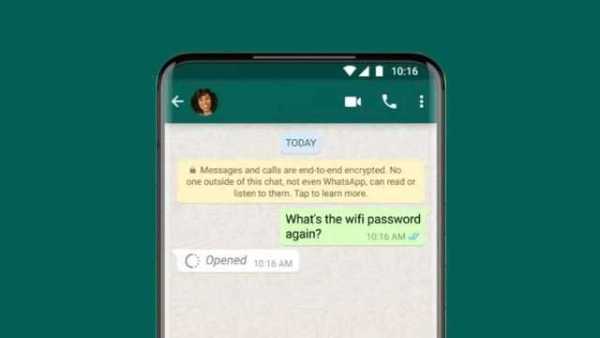
WhatsApp's privacy feature, called "View Once," allows you to send photos, videos, and voice messages that disappear automatically after being viewed by the recipient.
Notably, this facility also prevents recipients from saving, forwarding, or taking screenshots of the media content you have shared.
Here's how to send view once media messages on WhatsApp.
Sending 'View Once' media
User guide
To use the "View Once" feature, users will have to open an individual or group chat on WhatsApp.
After tapping the attach button, they can either take a new photo/video or select an existing one from their device.
By selecting the view once (indicated with 1) button next to the text bar, they would be able to activate this mode before sending the media content.
'View Once' mode for voice messages
Voice feature
The "View Once" feature also applies to voice messages.
To send a voice message in this mode, users tap the microphone icon in an individual or group chat.
After swiping up to lock the recording, they select the view once icon.
When this option turns green, it means the mode is active and the audio is ready to be sent in view once format.
How to open such messages
Accessing content
To access "View Once" media or voice messages, recipients just tap on the message.
They can view the photo/video or listen to the voice message. After viewing or listening, users swipe or tap back to exit.
An "Opened" receipt will appear in the chat for media or voice messages that have been viewed, confirming access.
-
Love Horoscope Today for Wednesday, May 20, 2026: Cancer signs will find strength in relationships, know the status of other signs

-
IPL 2026 Final: What Happens If Rain Washes Out RCB vs GT? Check Rules
-
Severe Storm Alert For Noida, Ghaziabad, Meerut And Nearby Areas; Winds May Touch 90 Kmph
-
Karnataka CLP Picks DK Shivakumar As Leader, Oath Likely On June 3
-
TMC MP Abhishek Banerjee Slapped, Attacked & Heckled During Sonarpur Visit