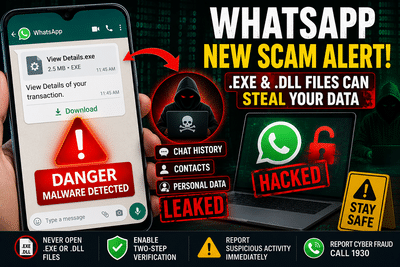
A new WhatsApp scam is targeting users through malicious file attachments disguised as important documents. Cybersecurity authorities have warned that attackers are sending executable files with names such as "View Details," "Invoice," or "Document" to trick people into installing malware on their devices.
Unlike traditional scams that rely on OTPs or phishing links, this campaign uses .EXE and .DLL files to compromise devices. Once the malicious file is opened, hackers may gain unauthorized access to WhatsApp data, including chat history and contact lists, putting both users and their contacts at risk.
Cybersecurity Warning Over Fake WhatsApp AttachmentsCybersecurity awareness platform Cyber Dost, an initiative associated with the Indian Cyber Crime Coordination Centre (I4C), has issued a public warning about the latest WhatsApp scam.
According to the advisory, fraudsters are circulating executable files disguised as legitimate documents. The files often appear to contain invoices, payment details, or other important information to encourage recipients to open them without suspicion.
These files typically carry extensions such as:
- .EXE
- .DLL
Since these are executable program files rather than normal documents, opening them can trigger the installation of malicious software.
How the Scam WorksThe attack follows a simple but effective sequence.
First, victims receive a WhatsApp message containing what appears to be an important attachment. The file name may include terms like "View Details," "Invoice," "Document," or similar phrases designed to create urgency.
Once the recipient downloads and runs the file, malware is silently installed on the device.
The malicious software may then attempt to:
- Access WhatsApp Web sessions
- Collect chat history
- Retrieve saved contacts
- Monitor user activity
- Capture sensitive information stored on the device
Because the attack relies on malware installation, users who execute the file unknowingly give attackers an opportunity to compromise their personal information.
Why the Attack Is DangerousOne of the biggest risks is that cybercriminals may misuse the victim's WhatsApp account to target friends, family members, and colleagues.
After gaining access, scammers can send convincing messages pretending to be the legitimate account owner. These messages often request urgent financial assistance or encourage recipients to click additional malicious links.
Since the requests appear to come from a trusted contact, people may be more likely to believe them and transfer money or reveal sensitive information.
The attack can therefore spread rapidly through personal contact lists.
How to Protect YourselfCybersecurity experts recommend following a few basic precautions to reduce the risk of becoming a victim.
Avoid Executable FilesNever download or open .EXE or .DLL files received through WhatsApp, especially if they come from unknown numbers or unexpected conversations.
Legitimate documents are usually shared in formats such as PDF, DOCX, JPG, or PNG—not executable program files.
Verify Suspicious MessagesIf someone you know sends an unusual attachment or requests urgent action, contact them through a phone call or another trusted method before opening the file.
This helps confirm whether the message is genuine or the result of a compromised account.
Enable Two-Step VerificationWhatsApp's Two-Step Verification feature adds an extra security layer by requiring a PIN when registering the account on a new device.
Activating this feature makes unauthorized account access significantly more difficult.
Keep Your Device UpdatedInstall operating system and security updates regularly to reduce the risk of malware exploiting outdated software.
Using reputable antivirus software can also help detect and block malicious files before they execute.
What to Do If You Opened the FileIf you accidentally downloaded and executed a suspicious attachment, act immediately.
Recommended steps include:
- Disconnect the affected device from the internet if possible.
- Scan the device using trusted antivirus software.
- Inform your WhatsApp contacts that your account may have been compromised.
- Change important passwords if necessary.
- Report the incident to India's national cybercrime helpline by calling 1930 or filing a complaint through the official cybercrime reporting portal.
Taking prompt action may help limit further damage and prevent attackers from misusing your account.
Key Safety Tips- Never open .EXE or .DLL attachments received through WhatsApp.
- Be cautious of files labeled "View Details," "Invoice," or "Document" from unknown senders.
- Enable WhatsApp Two-Step Verification.
- Verify suspicious messages before responding.
- Report cyber fraud immediately if you suspect your account has been compromised.
Cybercriminals continue to develop new methods for targeting messaging platform users. While phishing links and OTP scams remain common, malware-based attacks using executable files represent an increasingly serious threat.
Remaining cautious about unexpected attachments, enabling WhatsApp's built-in security features, and reporting suspicious activity promptly can significantly reduce the chances of falling victim to these evolving cyber scams.
-
Removing Dharmendra Pradhan is the strictest action: CJP to Modi

-
Minister, State Education Centre And UDISE+ Present Conflicting Picture Of School Infrastructure In Madhya Pradesh

-
Commerce Ministry Exempts Exports From FDI Restrictions

-
Directorate Of Enforcement Arrests Three In ₹70 Crore MD Trafficking Case In Indore

-
NFR Announces Shravani Mela Special Train Service Between Katihar and Manihari