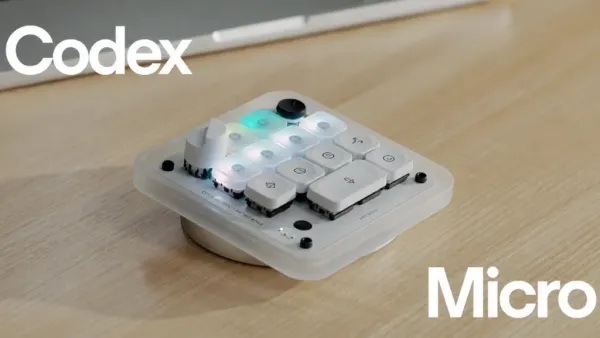
OpenAI has officially entered the physical hardware market. Built in tandem with boutique designer Work Louder, the $230 Codex Micro (internally designated as the kbd-1.0-codex-micro) is a fascinating, physical pivot.
Software engineering is mutating. It is no longer just about writing code; it is about managing an entire armada of AI agents.
Senior developers now spend more time babysitting asynchronous code tasks than typing out functions manually. This mechanical macro pad aims to offload that exact mental tax by turning a browser-based workflow into a tactile, physical dashboard.
From Chatbox to Cockpit: How the Codex Micro Automates Your Workflow
You can now forget typing letters. The Codex Micro operates as a physical control board for the desktop ChatGPT Codex app.
Essentially, it translates the development cycle into physical switches.
(Local IDE Context)
        │
        ▼
(Flick Joystick) ──► (Trigger Agent Workflow (PR/Refactor))
        │
        ▼
(Turn Rotary Dial) ──► (Scale Reasoning Level Up/Down)
        │
        ▼
(Glance Agent Keys) ──► (Monitor Live RGB Status Updates)
- Workflow Execution (The Joystick):
A multi-directional, planar joystick lets you trigger pre-mapped macros instantly. You can launch pull request reviews or fire up debuggers without your hands ever leaving your setup or breaking focus in the IDE.
- Dynamic Brainpower Tuning (The Dial):
A dedicated rotary knob hooks straight into the AI’s reasoning engine. Twist it down for a quick syntax format, or crank it up when you hit a wall and need deep, architectural logic.
- Asynchronous Thread Monitoring:
Six frosted mechanical “Agent Keys” represent active, background tasks. Tap once to switch your workspace view, or double-tap to pull an asynchronous background agent front and center.
Peripheral Vision Monitoring in Codex Micro: The RGB Interface Matrix
Autonomous agents can make developers waste hours hunting through tabs just to check if a script is finished.
By shifting these status checks to your peripheral vision, the Codex Micro uses a dead-simple, five-color RGB grid to show real-time progress:
| LED Color | What the AI is Doing | What You Need to Do |
| White | Idle / Empty Slot | Queue up a new task. |
| Blue | Deep Processing | Let it cook. An asynchronous compute is running. |
| Green | Compilation / Chat Finished | Review the code or stage it. |
| Peach / Amber | Human approval needed | Jump in. It needs a prompt response or sign-off. |
| Red | System Exception / Error | The pipeline broke. Fix it now. |
Inside the Build: Specs, Switches, and CNC Aluminum Armor
The macro pad utilizes Work Louder’s Creator Micro 2 chassis, heavily customized with a specialized internal keyset driver.
┌────────────────────────────────────────────────────────┐
│ (Agent Key 1) (Agent Key 2) (Agent Key 3) (Reasoning) │
│ (Agent Key 4) (Agent Key 5) (Agent Key 6)   ( Dial )  │
│                                                        │
│ (Command Key: Accept)   (Command Key: Reject)          │
│ (Command Key: PTT)      (Command Key: New Chat)        │
│                                                        │
│      (   Touch Sensor Layer   )    ( Joystick )        │
└────────────────────────────────────────────────────────┘
- The Build:
It sports a CNC-milled polycarbonate and aluminum frame with a heavy, sandblasted, anodized baseplate built for daily desk abuse.
- Tactile Response:
Low-profile, hot-swappable, and highly durable POM/POK switches handle up to 50 million keystrokes. They operate with a light 40±10 gf actuation force and a shallow 2.8±0.25 mm travel. You can opt for clicky keys (Orange stem) or silent linears (Blue stem).
- Getting Connected:
It plays nicely with Windows or macOS over Bluetooth or USB-C. Layout configurations run through the Work Louder Input utility right alongside OpenAI’s app.
The Hidden Carbon Footprint of Tactile AI
Physical hardware carries an environmental footprint that extends far beyond digital code:
- Physical Footprint:
Moving OpenAI’s footprint from the cloud to your desk means aluminum manufacturing, plastic keycap production, and lithium-ion battery mining.
- The Upgradability Trap:
If developers treat these macro pads like disposable smartphones—upgrading them with every annual software refresh—we face a massive spike in e-waste.
- Frictionless Exhaust:
A physical dial makes triggering incredibly heavy, multi-token AI compute cycles effortless. By making maximum-capacity reasoning models just a physical twist away, it accidentally encourages massive, sustained data center loads, causing an unseen carbon footprint explosion.
Is the Codex Micro Worth $230? Our Final Verdict
While a $230 macro pad is undeniably niche, it lays down a fascinating blueprint. Soon, programming might feel less like writing text and a lot more like directing traffic from a cockpit.
Ready to stop hunting through browser tabs and start commanding your AI agents with mechanical precision? Order the Codex Micro today and transform your desktop setup into a high-performance developer cockpit.
-
Are you cheating on your love partner? Punishment is written in Garun Purana

-
Samsung Music Studio Series: Samsung launches two new premium Wi-Fi speakers in India, price starts from ₹ 27,900
-
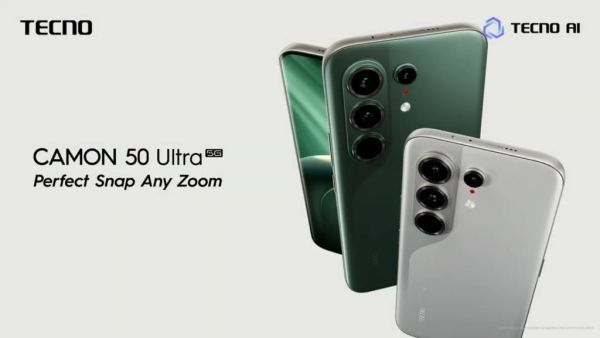
Tecno Camon 50 Ultra 5G entered India today, powerful features revealed before launch
-
Joe Root stuck on 99! Fellow player’s four deprived him of a century, yet he won hearts

-
‘At Lord’s…’ What did Team India’s coach say amid the news of Rohit’s retirement?