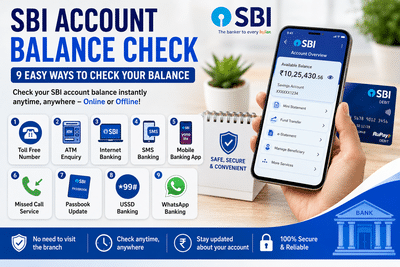
Managing your bank account has become much easier thanks to digital banking services. If you have an account with the State Bank of India (SBI), you no longer need to visit a branch or update your passbook every time you want to check your account balance.
SBI offers multiple online and offline options that allow customers to access their account information within minutes. Whether you have internet access or prefer traditional banking methods, there are several convenient ways to check your balance anytime and from virtually anywhere.
Here's a complete guide to the various methods available for SBI customers.
1. Check Your Balance Using SBI Toll-Free BankingSBI customers can check their account balance by calling the bank's balance enquiry service from their registered mobile number.
How it works- Dial the SBI balance enquiry toll-free number using your registered mobile number.
- The call disconnects automatically after a few rings.
- An SMS containing your available account balance is sent to your mobile phone.
This method is especially useful for customers who need quick account information without internet access.
2. Use an SBI ATMCustomers holding an SBI Debit Card can check their account balance through any SBI ATM or other compatible ATMs.
Steps- Insert your debit card.
- Enter your ATM PIN.
- Select Balance Enquiry.
- Your available account balance will appear on the screen.
Most ATMs also provide a Mini Statement, allowing customers to view recent transactions.
3. Check Balance Through SBI Internet BankingCustomers registered for SBI Internet Banking can monitor their account online from any computer or mobile browser.
Steps- Log in to the official SBI Internet Banking portal.
- Enter your User ID and Password.
- Open the Accounts section.
- View your account balance and recent transaction history.
Internet Banking also provides access to fund transfers, account statements, bill payments, and several other banking services.
4. Use SBI SMS BankingSBI offers SMS Banking for customers who prefer receiving account information via text messages.
Before using this service, customers must register for SMS Banking.
After registration, users can access services such as:
- Balance enquiry
- Mini statement
- E-statement requests
- Other banking information
This option is convenient for customers who do not regularly use mobile banking apps.
5. Check Balance Through the SBI Mobile Banking AppSBI's mobile banking application allows customers to manage their accounts directly from their smartphones.
Steps- Download the official SBI Mobile Banking application.
- Sign in using your banking credentials.
- Select the Balance Enquiry option.
- View your available account balance instantly.
Besides balance enquiries, the app supports fund transfers, bill payments, deposits, and many other banking services.
6. Use SBI Missed Call BankingCustomers can also check their balance using SBI's missed call banking facility.
To use this service:
- Your mobile number must be registered with your SBI account.
- Give a missed call to the designated SBI balance enquiry number.
- The bank will send your account balance through SMS.
This is one of the quickest ways to check your balance without internet connectivity.
7. Update Your SBI PassbookCustomers who prefer traditional banking can still use their passbook to check account details.
Visit your nearest SBI branch and update your passbook.
The updated passbook will display:
- Current account balance
- Deposit entries
- Withdrawals
- Recent transactions
Many branches also provide self-service passbook printing kiosks for added convenience.
8. Check Balance Using USSD BankingSBI customers without internet access can also use USSD banking services.
General process- Dial the SBI USSD service code from your registered mobile number.
- Select Balance Enquiry from the available menu.
- Enter your Mobile PIN (MPIN).
- Your account balance will be displayed on your phone.
USSD banking works on both smartphones and feature phones, making it useful in areas with limited internet connectivity.
9. Use SBI WhatsApp BankingSBI also offers selected banking services through WhatsApp.
Eligible customers can use the bank's official WhatsApp Banking service to access information such as:
- Account balance
- Mini statement
- Other supported banking services
Customers should ensure they are using only the bank's officially verified WhatsApp service.
Benefits of Checking Your Account RegularlyKeeping track of your account balance offers several advantages:
- Monitor daily transactions.
- Detect unauthorized or suspicious activity quickly.
- Avoid insufficient balance situations.
- Manage spending more effectively.
- Stay informed about salary credits, refunds, and other deposits.
Regular account monitoring also helps customers identify any discrepancies at an early stage.
Choose the Method That Works Best for YouSBI provides a wide range of balance enquiry options to suit different customer preferences. Whether you choose Internet Banking, the mobile app, ATM, missed call service, SMS Banking, WhatsApp Banking, USSD, or the traditional passbook method, accessing your account information is now faster and more convenient than ever.
With digital banking services continuing to expand, SBI customers can securely manage their finances without needing to visit a bank branch for routine account enquiries.
Disclaimer: Banking services, registration requirements, enquiry numbers, and digital features may change over time. Customers should refer to SBI's official channels for the latest instructions, supported services, and applicable charges before using any banking facility.
-
Brook upbeat about England ODI form amid Test captaincy uncertainty

-
England can learn from 'phenomenal' Joe Root after match-winning 99 not out vs India in second ODI, says Harry Brook

-
Virgo Horoscope Today, July 17, 2026: Health Troubles Will Ease, Work and Business Will Progress

-
Virgo Daily Horoscope Today (Aug 23 - Sep 22), July 5, 2026

-
Virgo Daily Horoscope Today (Aug 23 - Sep 22), July 6, 2026: Will Show Generosity, Will Increase Self-Control