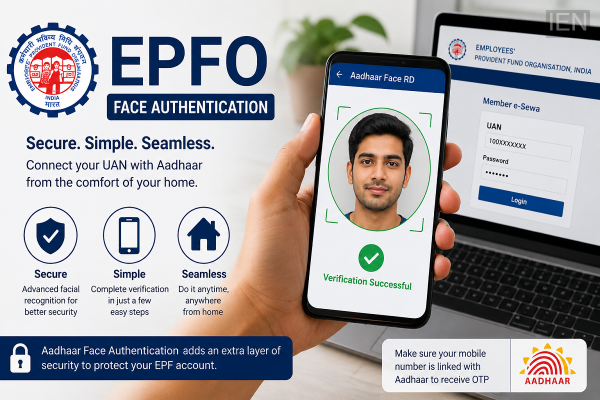
Employees who contribute to the Employees' Provident Fund (EPF) may have recently noticed a notification asking them to complete Aadhaar Face Authentication for their EPF account. The new verification process has been introduced by the Employees' Provident Fund Organisation (EPFO) to strengthen digital security and reduce the risk of identity fraud during online services.
Many subscribers are unsure whether the verification is mandatory or how it can be completed. The good news is that eligible users can finish the process from home in just a few minutes using their smartphone.
Why Is EPFO Introducing Aadhaar Face Authentication?
EPFO has been expanding its digital services to make account management easier and more secure for millions of members. Aadhaar Face Authentication adds an additional layer of identity verification by matching the user's live facial scan with the photograph stored in the Aadhaar database.
This system is designed to help prevent unauthorized access, identity theft, and fraudulent transactions related to Provident Fund accounts.
If you have received a message requesting Face Authentication, it is advisable to complete the verification using the official EPFO or UMANG platform.
What You Need Before Starting
Before beginning the verification process, make sure you have the following:
-
An active Universal Account Number (UAN)
-
Aadhaar linked with your registered mobile number
-
A smartphone with a working front camera
-
Stable internet connection
-
Latest version of the UMANG app
-
Aadhaar FaceRD application installed on your phone
The OTP required during the verification process will be sent to the mobile number registered with your Aadhaar. If your Aadhaar is not linked to your current mobile number, you may need to update it before proceeding.
How to Complete EPFO Face Authentication
The authentication process is simple and can be completed without visiting an EPFO office.
Step 1: Open the EPFO Portal or UMANG App
Launch the official UMANG application or access the relevant EPFO digital service on your mobile device.
Step 2: Log In Using Your UAN
Enter your Universal Account Number (UAN) and complete the OTP verification sent to your registered mobile number.
Step 3: Select Face Authentication
After logging into your account, look for the Face Authentication or Face Verification option. If it is not immediately visible, use the search feature within the app.
Step 4: Open Aadhaar FaceRD App
When you tap the Face Authentication option, the system will automatically redirect you to the Aadhaar FaceRD application.
Grant camera permission if prompted.
Step 5: Scan Your Face
Stand in a well-lit area and hold your phone at eye level.
Look directly into the camera and remain still while the application scans your face. The verification usually takes only a few seconds.
Step 6: Verification Complete
If the live facial image matches the photograph stored in the Aadhaar database, the system will display a Verification Successful or Authentication Successful message.
Once completed, your identity verification process is finished.
Why Aadhaar Face Verification Matters
Face Authentication is intended to improve security while making digital services more convenient. Instead of relying only on passwords or OTPs, the additional biometric verification helps ensure that only the genuine account holder can access sensitive EPFO services.
This technology can also reduce the chances of fraudulent withdrawals, fake identity claims, and unauthorized account access.
Tips for Successful Face Authentication
To avoid authentication failures, keep these points in mind:
-
Ensure adequate lighting during the scan.
-
Remove sunglasses or anything covering your face.
-
Keep the phone steady at eye level.
-
Clean the camera lens before scanning.
-
Make sure your internet connection remains stable.
-
Use the latest versions of both the UMANG and Aadhaar FaceRD apps.
Final Thoughts
EPFO's Aadhaar Face Authentication initiative is part of its broader effort to strengthen digital security and improve member services. By allowing subscribers to verify their identity remotely, the organisation aims to make account access safer while reducing the need for physical visits.
If you have received a Face Authentication notification from EPFO, completing the verification through the official platforms is a quick process that can be done from the comfort of your home, provided your Aadhaar-linked mobile number and UAN details are up to date.
-
Xabi Alonso Faces Early Setback at Chelsea as Transfer Target Slips Away

-
Major update for EPFO users! Two services have been removed from the portal; the UMANG app must now be used instead.
-
Amarnath Yatra: Special preparations at Jammu Tawi Railway Station; know about the facilities before you travel

-
Toll Tax: No toll if there's a long queue on the highway? NHAI finally clarifies the rule.
-
How does one get a job as a counting staff member at the Ram Mandir? Find out how the selection process works.