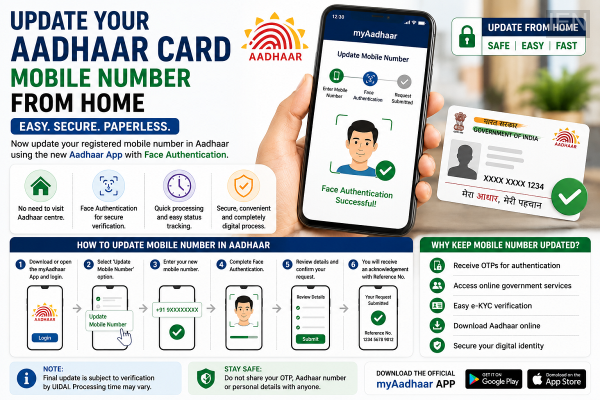
Updating the mobile number linked to your Aadhaar card is becoming more convenient with the launch of the new Aadhaar mobile application. Instead of visiting an enrolment centre for every update request, eligible users can now submit a mobile number update request from home using facial authentication through the official app.
The new process is aimed at simplifying Aadhaar services while reducing the need for in-person visits. Here's how the system works and what users should know before updating their registered mobile number.
Aadhaar Mobile Number Update Now Starts Online
The updated Aadhaar app allows users to initiate a request to change or update the mobile number linked to their Aadhaar card without standing in long queues.
Using the app, users can verify their identity through Face Authentication, eliminating the need for physical biometric verification at the initial stage.
Once the request is submitted successfully, it is processed by the authorities according to the prescribed verification procedures.
How to Update Your Aadhaar Mobile Number
If your device supports the latest Aadhaar application, follow these general steps:
-
Download or update the official Aadhaar mobile app.
-
Sign in using the required authentication process.
-
Select the option to update your mobile number.
-
Enter the new mobile number you want to link with Aadhaar.
-
Complete the Face Authentication process by following the on-screen instructions.
-
Review the details and submit your request.
After successful submission, you will receive an acknowledgement or reference number to track the update status.
Face Authentication Makes the Process Easier
One of the biggest improvements in the new Aadhaar app is the integration of Face Authentication.
Instead of relying solely on fingerprint or iris verification, users can confirm their identity using the smartphone's camera. This makes the service more accessible for many users and helps reduce the need to visit physical Aadhaar service centres for initiating eligible requests.
How Long Does the Update Take?
The processing time may vary depending on verification requirements and system workload.
Once the request has been successfully verified and approved, the new mobile number will be updated in the Aadhaar database. Users can track the progress using the acknowledgement details generated after submitting the request.
Why Keeping Your Aadhaar Mobile Number Updated Matters
A registered mobile number plays an important role in accessing several Aadhaar-based services.
An updated number helps users:
-
Receive OTPs for authentication.
-
Access online government services.
-
Download Aadhaar digitally.
-
Complete e-KYC verification.
-
Use various digital identity services securely.
Keeping the registered number current also helps prevent delays while accessing essential services.
Things to Remember Before Updating
Before submitting your request, ensure that:
-
Your new mobile number is active.
-
You have access to a compatible smartphone for Face Authentication.
-
Your Aadhaar details are entered correctly.
-
You retain the acknowledgement number until the process is completed.
Final Takeaway
The new Aadhaar mobile app is making identity management more convenient by allowing eligible users to initiate a mobile number update request from home using Face Authentication. While the final update remains subject to verification, the digital process significantly reduces paperwork and saves time compared to traditional offline methods. Users are encouraged to keep their Aadhaar-linked mobile number updated to ensure uninterrupted access to authentication, e-KYC, and various government services.
-
Amit Shah Calls DGP Meet To Plan Nationwide Action Against Illegal Immigrants

-
Tottenham’s 10 Biggest Transfer Deals Ranked Following Mateus Fernandes Agreement

-
How the cocoa price crash is crushing West African farmers

-
Fibe IPO Pitch: More Than A Personal Loan Platform, But Will Investors Buy In?

-
PRISM DRHP: A Look At Shareholding Pattern & Key Personnel