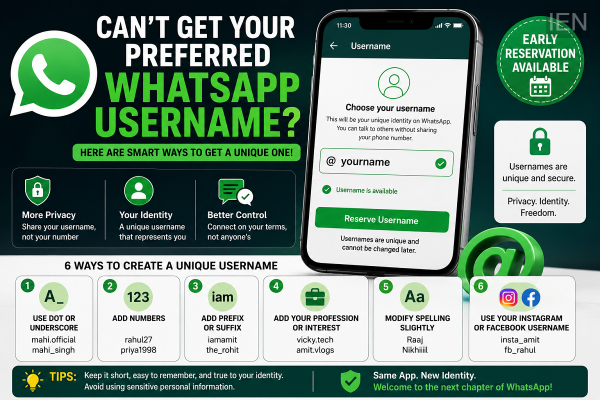
WhatsApp has started allowing users to reserve usernames ahead of the full rollout of its new Username feature. However, many users are discovering that their preferred username is already unavailable because every username on the platform must be unique.
If you're unable to claim your first choice, there are several simple ways to create a unique username that still reflects your identity. From adding symbols and numbers to using your social media handle, here are practical tips to help you reserve a username you'll be happy with.
Why Is Your Preferred Username Unavailable?
WhatsApp does not allow two users to have the same username. Once a username has been reserved, no one else can use it.
As millions of users begin reserving their usernames, common names and popular words are quickly becoming unavailable. This is especially challenging for people with frequently used names.
Fortunately, there are several alternatives that can help you create a unique yet recognizable username.
Add a Dot or Underscore
One of the easiest solutions is to separate words or names using a period (.) or an underscore (_).
For example:
-
mahi.official
-
mahi_singh
-
rohit.tech
-
amit_design
Keep in mind that WhatsApp does not allow a username to begin or end with a dot or underscore.
Include Numbers
If your preferred username is already taken, adding meaningful numbers can help.
You can use:
-
Birth year
-
Lucky number
-
Favorite number
Examples include:
-
rahul27
-
priya1998
-
aman007
Choose numbers that are easy for you to remember while keeping the username simple.
Use a Prefix or Suffix
Another option is to add a word before or after your name.
Popular examples include:
-
iamamit
-
the_rohit
-
officialneha
-
itsvicky
-
realakash
These additions make the username unique without changing your original identity significantly.
Add Your Profession or Interest
Including your profession, hobby, or area of expertise is another effective way to create a distinctive username.
Examples include:
-
vicky.tech
-
kapil_design
-
amit.vlogs
-
neha_writer
-
ankitfitness
This approach is especially useful for creators, freelancers, entrepreneurs, and professionals who want to build a recognizable online identity.
Slightly Modify the Spelling
If your exact name is unavailable, you can make small spelling adjustments while keeping it recognizable.
For example:
-
Raj → Raaj
-
Nikhil → Nikhiiil
-
Aryan → Aryann
-
Riya → Riiya
Many users also prefer these creative spellings because they look modern and are easier to reserve.
Use Your Instagram or Facebook Username
If you already have a username on Instagram or Facebook, you can consider using the same one on WhatsApp.
Keeping the same username across platforms offers several advantages:
-
Consistent online identity.
-
Easier recognition by friends and followers.
-
Better branding for creators and businesses.
If your social media username is available on WhatsApp, using the same handle can make it easier for people to find and recognize you.
Reserve Your Username Early
WhatsApp is gradually rolling out the username reservation feature, allowing users to claim their preferred handle before the feature becomes fully available for messaging.
Since usernames are allocated on a first-come, first-served basis, users who receive access are encouraged to reserve their preferred username as early as possible.
Tips for Choosing a Good Username
Before confirming your username, consider these recommendations:
-
Keep it short and easy to remember.
-
Avoid using too many numbers or special characters.
-
Choose a name that reflects your identity or brand.
-
Avoid sharing sensitive personal information in your username.
-
Use a consistent username across platforms if you want stronger personal or business branding.
Final Thoughts
Not getting your preferred WhatsApp username doesn't mean you have to settle for something completely different. With small adjustments such as adding symbols, numbers, prefixes, professional identifiers, or slight spelling variations, you can create a unique username that remains personal, memorable, and easy to recognize. Reserving your preferred variation early can help ensure you secure the identity you want before the feature reaches all users.
-
Telangana STF seizes 102 kg ganja worth Rs 10 Lakh, arrests one
-
Govt failure led to first-ever Singareni officers strike: Harish
-
Two Indians hit the jackpot in Dubai, win Rs 9.50 cr each

-
Andhra CM Naidu lays foundation for Hero MotoCorp facility
-
Ahad Raza and Dananeer Mobeen’s cosy pics break internet