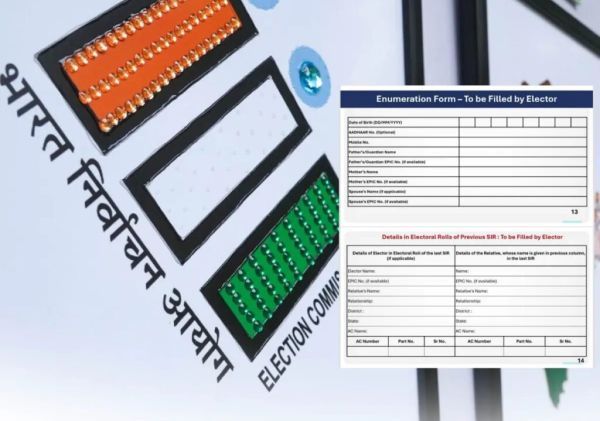
How is the Punjab SIR Enumeration Form divided?
The Punjab SIR Enumeration Form has three sections.
The top centre portion contains the name and details of the area’s BLO, along with a QR code for verification. This section is pre-filled by election officials and should not be completed by voters.
The left section is meant for voters whose names appeared in the 2003 electoral roll or those aged above 40 years. Applicants must provide their name, EPIC (Voter ID) number, father’s or spouse’s name, age, gender, Assembly Constituency, and the old Assembly, Part and Serial numbers.
The right section is for people who were not included in the 2003-04 voter list. This includes newly married women, first-time voters who have turned 18, or anyone not previously registered. If a voter does not have an EPIC card, “Not Applicable” should be mentioned. Family details can also be added to help officials link the records.
The final section must be completed by every applicant. It requires the Aadhaar number, mobile number, names of parents or spouse, their voter ID details, followed by the applicant’s signature or thumb impression and the date.
How to submit the Punjab SIR Enumeration Form online
Voters can also complete the Punjab SIR Enumeration Form digitally through the Election Commission’s portal or the Voter Helpline App.
First, log in or create an account using your mobile number and email ID. Next, open the “Special Intensive Revision (SIR) – Enumeration Form” option and enter your EPIC number.
Verify your existing details if you are already registered. If a new family member needs to be added, choose the “Add Family Member” option and enter the required information.
Finally, upload the completed form in PDF format and submit it. A reference number will be generated, which can be saved for future tracking. The concerned BLO will later visit the residence to physically verify the details.
FAQs
update voter details across Punjab.
Q. Who should fill the Punjab SIR Enumeration Form right section?
A. Newly eligible voters, newly married women, and people not listed in the 2003-04 voter roll should complete the right section.
Q. Can I submit the Punjab SIR Enumeration Form online?
A. Yes. The form can be submitted through the Voters’ Service Portal or the Voter Helpline App.
Q. Is physical verification required after online submission?
A. Yes. The concerned Booth Level Officer will visit your residence to verify the submitted details.
-
Reliance Foundation Hospital : New life for 6 patients in one day; A proud record of Reliance Foundation Hospital

-
Postpartum Yoga: These 3 easy yoga asanas will help in strengthening the pelvic floor after childbirth

-
A new explosion in the tech market! Vivo X Fold 6 with 200MP Camera Launched in China; The premium look caught the attention of users

-
Social media ban on children in Australia is not completely effective, government announced to increase strictness on tech companies

-
iPhone Fold will also be left behind! You will be shocked to see the screen of Apple iPhone Ultra 2, know when it will be launched