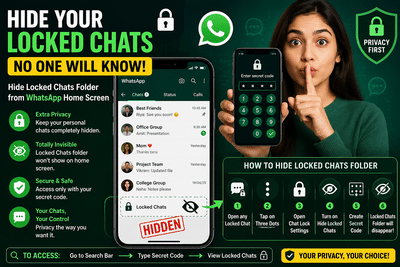
WhatsApp has become one of the most widely used messaging platforms in the world, helping millions of users stay connected with family, friends, and colleagues every day. As conversations on the app become increasingly personal, privacy features have also gained importance. To address this need, WhatsApp introduced the Chat Lock feature, allowing users to secure private conversations using passwords, fingerprints, or Face ID.
While the feature already helps users protect sensitive chats, many people may not realize that the “Locked Chats” folder itself remains visible on the WhatsApp home screen. This means that even if someone cannot open the chats, they can still see that certain conversations have been hidden.
Now, WhatsApp offers an additional privacy layer that allows users to completely hide the Locked Chats folder as well. With just a few settings changes, users can ensure that nobody even knows locked chats exist on their account.
Why Hiding Locked Chats MattersMany smartphone users hand their devices to friends, family members, or colleagues for various reasons. Even if chats are password protected, the visible “Locked Chats” section can attract unnecessary attention and curiosity.
For users who value complete privacy, hiding the Locked Chats folder provides extra security and peace of mind.
Once hidden, the folder can only be accessed using a secret code set by the user.
What Is WhatsApp Chat Lock?WhatsApp’s Chat Lock feature allows users to move selected conversations into a separate protected folder. These chats can only be opened using:
- Fingerprint authentication
- Face recognition
- Device password
- Secret code
Notifications from locked chats are also partially hidden, adding another layer of privacy.
How to Hide the Locked Chats Folder CompletelyWhatsApp now allows users to hide the Locked Chats section entirely from the app’s main screen. Here’s how to enable the feature:
Step-by-Step ProcessOnce this process is complete, the Locked Chats folder will disappear completely from the WhatsApp home page.
How to Access Hidden Locked Chats LaterAfter hiding the folder, users can still access their protected chats easily.
To open hidden chats:As soon as the correct code is entered, the hidden Locked Chats folder will instantly appear on the screen.
This ensures that only the person who knows the code can access the hidden conversations.
What If the Locked Chats Folder Disappears?Many users panic when they no longer see the Locked Chats section after enabling the feature. However, this is completely normal.
The folder is intentionally hidden and can only be restored temporarily by typing the secret code in the search bar.
If the correct code is entered, the hidden chats will become visible immediately.
Benefits of Using WhatsApp’s Hidden Chat Feature 1. Better Privacy ProtectionNobody can see that you have locked chats stored inside WhatsApp.
2. Extra Security LayerEven if someone unlocks your phone, they still cannot find hidden chats without the secret code.
3. Reduced CuriosityVisible locked folders often attract attention. Hiding them completely removes suspicion.
4. Easy Access for the OwnerUsers can quickly access hidden chats simply by entering the code.
Important Things to Remember- Choose a strong secret code that others cannot guess easily.
- Avoid sharing the code with anyone.
- Keep WhatsApp updated to access the latest privacy features.
- Secret codes work separately from your device password or fingerprint lock.
Over the past few years, WhatsApp has introduced several privacy-focused updates including disappearing messages, chat lock, screenshot protection, and advanced account verification tools.
The ability to completely hide locked chats reflects the growing demand for stronger personal privacy in messaging apps.
As online communication becomes more personal and sensitive, features like hidden chat folders are helping users maintain better control over their digital conversations.
-
One dead and four injured after fatal shooting in Sydney

-
Grooming gangs inquiry chairwoman insists: 'We're not squeamish about ethnicity'

-
Donald Trump 'thinks he's never leaving' as he boasts of lavish bunker for White House

-
Scones will be light and fluffy in 18 minutes with simple 3-ingredient recipe

-
Trump says 'GOOD RIDDANANCE!' after climate scientists scrap most apocalyptic scenario