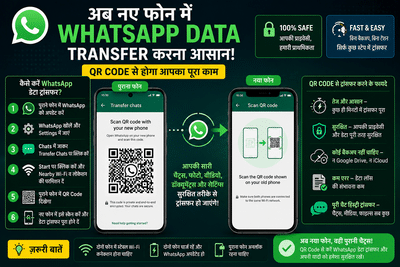
Switching to a new smartphone no longer means losing your chats, photos, videos, or important conversations on WhatsApp. Earlier, users had to rely heavily on cloud backups through Google Drive or iCloud, which often took time and sometimes failed during restoration. Now, WhatsApp has introduced a much simpler and faster method that allows users to transfer their entire chat history directly from one phone to another using a QR code.
This new feature has made the process extremely convenient for users who frequently upgrade their devices or buy a new smartphone. With just a few steps, all chats, media files, settings, and account information can be securely moved to a new device without needing complicated backup procedures.
What Is WhatsApp QR Code Chat Transfer?WhatsApp’s QR code-based transfer system allows users to migrate chats wirelessly between two smartphones connected to the same Wi-Fi network. Instead of uploading data to the cloud first and then downloading it again, the app directly transfers the information from the old phone to the new one.
The feature works much faster than traditional backup methods and significantly reduces the chances of missing chats or corrupted backup files.
Another major advantage is privacy. Since the transfer happens directly between devices, your personal conversations remain encrypted during the process.
Why This Feature Is ImportantFor millions of smartphone users, changing devices has always been stressful because of the fear of losing years of WhatsApp conversations. Many users also face issues such as:
- Slow backup restoration
- Insufficient cloud storage
- Internet interruptions
- Missing media files
- Incomplete chat recovery
The QR code transfer method solves most of these problems. It allows users to shift their WhatsApp account quickly while keeping all important conversations intact.
Step-by-Step Guide to Transfer WhatsApp Data Using QR CodeIf you are planning to move your WhatsApp account to a new phone, follow these simple steps carefully:
Step 1: Update WhatsAppMake sure WhatsApp is updated to the latest version on both your old and new smartphones.
Step 2: Open WhatsApp SettingsOn your old phone, open WhatsApp and go to:
Settings → Chats → Transfer Chats
Step 3: Start TransferTap on the “Start” option. WhatsApp will ask for permissions such as:
- Nearby Wi-Fi access
- Location permission
Grant these permissions to continue.
Step 4: Scan the QR CodeA QR code will appear on your old phone’s screen.
Now open WhatsApp on your new phone and scan the QR code displayed on the old device.
Step 5: Wait for Transfer CompletionOnce the QR code is scanned successfully, WhatsApp will begin transferring:
- Chats
- Photos
- Videos
- Voice notes
- Documents
- Settings
The transfer may take a few minutes depending on the amount of data.
After completion, your new phone will look exactly like your old WhatsApp account.
Benefits of QR Code Chat Transfer Faster Than Cloud BackupThe direct device-to-device method is much quicker compared to uploading and downloading large backups.
More SecureThe transfer remains encrypted, keeping private chats protected.
No Need for Extra StorageYou do not need additional Google Drive or iCloud storage space.
Reduced ErrorsThe chances of failed restorations or missing files are significantly lower.
Easy for EveryoneEven users with limited technical knowledge can complete the process easily.
Important Things to RememberBefore starting the transfer process, keep these points in mind:
- Both phones should have a stable Wi-Fi connection.
- The old phone must remain unlocked during transfer.
- Ensure both devices have enough battery power.
- WhatsApp should be updated to the latest version.
- The same phone number must be used on the new device.
Meta has been continuously improving the user experience on WhatsApp by introducing practical features focused on convenience and privacy. The QR code chat transfer system is one of the most useful additions for users upgrading their smartphones.
With this feature, transferring years of chats and memories has become much easier, safer, and faster than ever before. Users no longer need to worry about complicated backups or losing important conversations while switching devices.
-
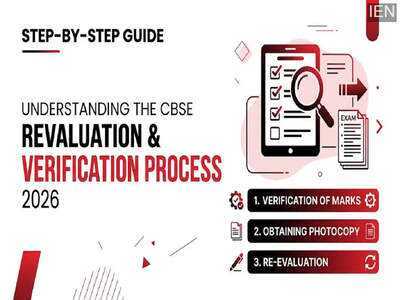
CBSE Launches Class 12 Revaluation Process for 2026: Key Details and Steps
-
State pension warning as Brits missing out on £3,237 urged to do one thing

-
Heatwave Intensifies In Odisha; Mercury Soars Past 40°C At 21 Places
-
'Demented' Trump draws attention to worrying part of his body live on Fox News

-
Tyson Fury's incredible £5m gift to Venezuela days after controversial wedding