
UPMSP 10th, 12th Results 2026 via UMANG App: The UP Board Class 10 and 12 results are scheduled to be declared today, with only a short time remaining until the announcement. The UP Board results will be released via a press conference. Once the results are declared, students will be able to check them by visiting the official websites: upmsp.edu.in and upresults.nic.in. In addition to the official websites, students will also be able to check and download their results on the UMANG App. But do you know how to check the UP Board results on the UMANG App? If you are unfamiliar with this process, don't worry; let's learn how to do it through this article today.
How to Check Results on the UMANG App?
To check their results on the UMANG App, students can follow the steps outlined below:
First, download the UMANG App on your mobile phone.
Next, register using your mobile number.
Then, type 'UP Board' in the search bar.
After that, click on the '10th Result 2026' or '12th Result 2026' link.
Enter your Roll Number (and School Code, if prompted) in the login window.
Click on 'Submit,' and your result will appear on the screen.
How to Check Results via SMS?
Students can also view their UPMSP Class 10 and 12 results for 2026 via SMS.
For Class 10 results: Type UP10 [Space] [Roll Number] and send the message to 56263.
For Class 12 results: Type UP12 [Space] [Roll Number] and send the message to 56263.
-
New Regulations for Online Gaming Introduced by Indian Government

-
Dubai: 5 weekend spots with free pool access, beach days and dining deals

-
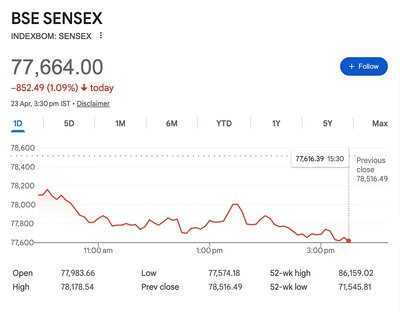
Late Sell-Off Shakes Dalal Street, Sensex Crashes 852 Pts While Nifty Drops 205 Points Below Key 24,200 Level Amid Banking & IT Weakness
-
Understanding Chanakya's Wisdom: The Choice Between Wealth and Women

-
Jet2 new check-in desk message for passengers flying to European holiday location