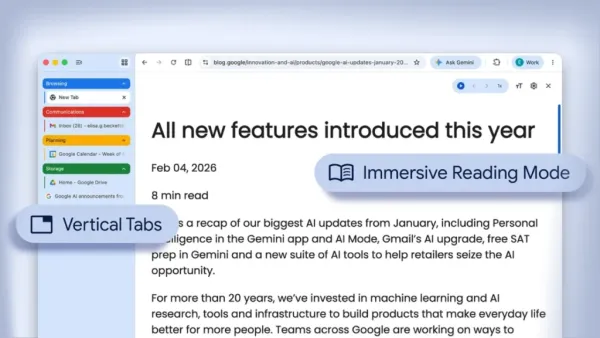
With the way people browse the Internet, many users end up with dozens of open tabs and a lot of clutter on their screens. Google addresses the issue of juggling multiple tabs and cluttered screens with the introduction of vertical tabs and an improved reading mode in Chrome. This Google Chrome update delivers better tab management and distraction-free reading, aligning Chrome with competitors like Microsoft Edge and Opera.
Vertical Tabs: A Better Way To Organize Tabs
A major part of this Google Chrome update is the addition of vertical tabs. Their company aims to give users greater control over their browser experience by offering a more streamlined way to organize tabs and pages. In place of the typical horizontal row of tabs located at the top of the screen, users can now switch to a tab installed in a vertical panel on the left-hand side of the screen. To enable vertical tabs, users simply right-click the tab bar and select the vertical tabs option.
This helps when users are completing their schoolwork, researching, or doing other activities. The full-screen reading mode creates a more immersive experience than previous iterations, as it no longer divides the page into two parts, leaving the environment free of distractions, similar to reading on a computer. This can impair focus when viewing a website. Chrome’s reading mode features enhance readability, reduce visual fatigue, and remove extraneous elements to improve the overall browsing experience.
How to enable vertical tabs in Chrome:
- Right-click on the tab bar
- Select the vertical tabs option (when available in your version)
This provides distraction-free browsing tools for students and professionals.
Homes Of These Features
If you have been using browsers like Microsoft Edge or Opera, you may have already experienced reading mode and vertical tabs. Google is simply responding to the modern norm of browsing with its newest features. In addition to this feature set’s modern enhancements, Chrome has added flexibility for its users through two tab-organizing formats: the regular horizontal tab behavior and vertical tab organization, based on personal preference. This change will create a comfortable browsing experience for new and traditional Chrome users.
Who Will Benefit Most From This Change?
The reading mode and vertical tab capabilities being added to Chrome will benefit a diverse range of users.
Students
Students who use multiple browser tabs for research materials will benefit from improved organization and easier access to information. They will also benefit when using read mode for their notes or articles.

Professionals
Professionals who handle email, documents, and online tools will appreciate the ability to streamline their workflow and save time when switching between browser tabs.
General Users
Anyone from the general public who reads blogs, news articles, or long-form articles will be able to do so with a cleaner, more pleasant reading experience.
When Do You Expect to See the New Features?
The new features will be unveiled gradually, so they won’t be immediately available to all Chrome users once released. Users may have to provide feedback to the Chrome Community before they can see these features in modern versions of the browser. Updates introduce features in specific phases to allow time for user feedback from users and to ensure they function as intended before being rolled out as final versions of Chrome.
The Big Picture: Smarter Browsing Tools
This update comes at a time when other tech companies are doing the same, creating products that meet user needs and, in the process, help them become more productive.
As online use increases, the way people work on the Internet needs to evolve; this means tools will also need to change so we can make it easy for people to use their computers every day. Instead of creating elaborate new features, Google has focused on improving basic yet essential elements of how we routinely use our browsers, such as managing tabs and reading web content.

Final Thoughts
These additions of vertical tabs in Chrome and an improved reading mode solve real issues, including having too many tabs open at once or being distracted from reading online content, and make Chrome a more practical and user-friendly browser, an easier and more productive tool to use. These features may not seem like a major breakthrough, but they still have a considerable positive impact on how we regularly interact with the web.
-
From 'BuddhaBot' to $1.99 chats with AI Jesus, the faith-based tech boom is here

-
Flipkart, Amazon expand dark stores as profit check slows quick commerce majors

-
Indian-origin man in Singapore jailed for forging bank documents

-
Canada expands work access for international students, graduates

-
Kerala Karunya KR-749 lottery result out today, 11-04-2026; Check ₹1 crore prize winner and complete list here