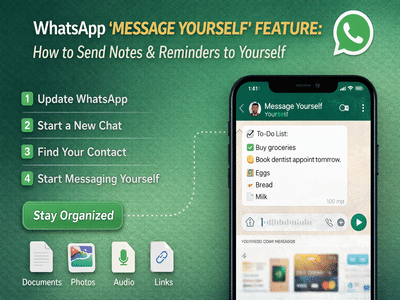
WhatsApp has introduced a useful new feature called “Message Yourself,” designed to help users stay organized within the app. The feature is being rolled out gradually to both Android and iOS users and is expected to reach all devices over time.
This addition transforms WhatsApp into more than just a messaging platform—it now doubles as a personal note-taking and reminder tool. With a dedicated self-chat, users can quickly jot down ideas, save important links, create shopping lists, or store essential documents without relying on third-party apps.
What Is the ‘Message Yourself’ Feature?The “Message Yourself” feature allows users to start a one-on-one conversation with their own number. This private chat works just like any other WhatsApp conversation, but instead of messaging another person, you send messages to yourself.
It acts as a digital notebook where you can store notes, reminders, tasks, and even multimedia files. Since everything is synced across devices, your saved content is easily accessible anytime.
Why This Feature Is UsefulIn today’s fast-paced digital environment, users often need a quick way to store information on the go. While many people use separate apps for notes or reminders, WhatsApp’s new feature simplifies this process by keeping everything in one place.
Whether you want to:
- Save a quick reminder
- Keep track of daily tasks
- Store important files or images
- Share links for later reading
This feature offers a convenient and familiar interface to manage it all.
Step-by-Step Guide to Use ‘Message Yourself’ on WhatsAppFollow these simple steps to start using the feature:
Step 1: Update WhatsApp
Make sure you have the latest version of WhatsApp installed from your device’s app store.
Step 2: Open the App
Launch WhatsApp on your smartphone.
Step 3: Start a New Chat
Tap on the “New Chat” icon, usually located at the bottom right corner of the screen.
Step 4: Find Your Contact
In the contact list, your own number will appear at the top.
Step 5: Start Messaging Yourself
Tap on your contact card to open the chat window and begin sending messages to yourself.
The feature also supports sharing different types of content. You can send:
- Photos and videos
- Voice notes
- Documents
- Links
To share content, simply open the file from your phone, tap the “Share” option, and select WhatsApp. Then choose your own contact to send it directly to your self-chat.
Additional Features: Polls Now AvailableAlongside the “Message Yourself” feature, WhatsApp has also rolled out a Polls option for users. This feature allows you to create polls in both individual and group chats.
To use Polls:
- Open any chat window
- Tap on the attachment icon
- Select “Poll”
- Enter your question and answer choices
This makes it easier to gather opinions or make group decisions directly within the app.
Final ThoughtsThe “Message Yourself” feature adds a practical layer of productivity to WhatsApp. By combining messaging with note-taking capabilities, it reduces the need for multiple apps and keeps everything centralized.
As the feature continues to roll out globally, users can expect a smoother and more organized messaging experience. Whether for personal reminders or storing important content, this simple tool can significantly enhance everyday digital communication.
-
Mahima Chaudhry Reflects on Her Early Career and Industry Changes

-
Celebrities are 'nervous' about spending time with Meghan after Kardashian scandal

-
Exploring Women in Hindu Mythology Considered Virgin Despite Marriage

-
A Shocking Betrayal: Newlywed Bride Disappears After Just 50 Days

-
IPL 2026: Rain Disrupts KKR vs PBKS Match, Shreyas Iyer's Sister Mocks KKR