WhatsApp is one of the most widely used messaging apps in the world, connecting billions of users for personal and professional communication. However, its popularity also makes it a frequent target for hackers and online scammers.
When a WhatsApp account is compromised, attackers may gain access to chats, impersonate the user, or send fraudulent messages to contacts. If you suspect your account has been hacked or taken over, acting quickly can help you regain control and prevent misuse.
Here is a complete guide explaining how to recover a compromised WhatsApp account and secure it from further threats.
Signs Your WhatsApp Account May Be CompromisedBefore taking recovery steps, it’s helpful to identify the warning signs of a hacked account.
Some common indicators include:
-
Being logged out of WhatsApp unexpectedly
-
Receiving messages about login attempts you didn’t make
-
Friends reporting strange messages sent from your account
-
Changes in your profile information or settings
-
Unknown devices linked to your account
If you notice any of these signs, it is important to take immediate action.
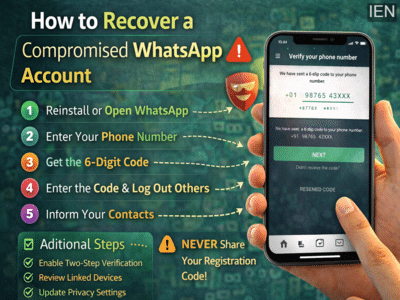
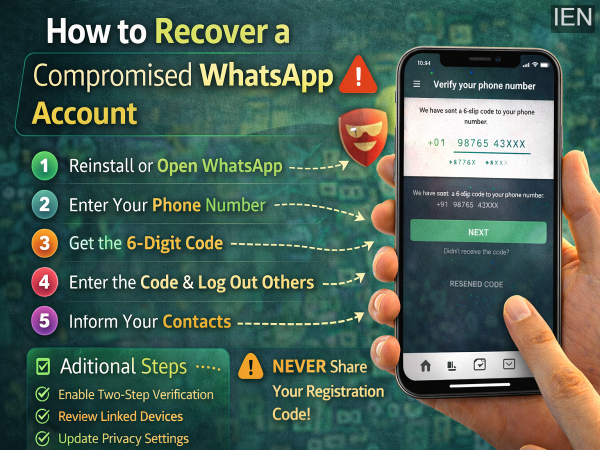
Step-by-Step Guide to Recover Your WhatsApp AccountIf you lose access to your account, you can usually recover it by verifying your phone number again.
Step 1: Reinstall or Open WhatsAppOpen WhatsApp on your smartphone and tap Log back in, then select Continue.
Step 2: Enter Your Phone NumberProvide your full international phone number, including the country code.
For example, users in India should enter numbers beginning with +91.
Step 3: Verify with the 6-Digit CodeWhatsApp will send a 6-digit verification code via SMS or voice call. Enter the code in the app.
Once you successfully verify the code, WhatsApp will automatically log out all other devices currently connected to your account.
This means the person who accessed your account will lose access immediately.
What If Two-Step Verification Is Enabled?In some cases, the attacker may have enabled two-step verification on your account.
If this happens, WhatsApp may ask you to enter a two-step verification PIN.
-
If you know the PIN, enter it to regain full access.
-
If you don’t know the PIN, you may need to wait up to seven days before accessing the account again.
Even if the PIN is unknown, entering the SMS verification code will still log out anyone using your account.
Inform Your Contacts ImmediatelyIf you suspect someone has been using your WhatsApp account, it’s important to inform your friends and family.
Hackers often impersonate victims and send messages asking for money, verification codes, or personal information.
Alerting your contacts helps prevent them from falling victim to scams sent from your compromised account.
Important Security Advice from WhatsAppWhatsApp strongly advises users never to share their registration code with anyone.
Even if the request appears to come from a friend or family member, sharing this code can allow others to gain control of your account.
It’s also important to note that WhatsApp cannot deactivate your account on your behalf, because the company has no reliable way to verify the true owner of the phone number.
Additional Steps to Secure Your AccountAfter recovering access, you should take a few extra precautions to protect your account.
Consider the following actions:
-
Enable two-step verification in WhatsApp settings
-
Review linked devices and remove unknown ones
-
Update your privacy settings
-
Block and report suspicious accounts
If you encounter users attempting scams or suspicious activity, you can block or report them directly within the app. WhatsApp may suspend accounts that violate its terms of service.
Stay Vigilant Against WhatsApp ScamsWith messaging apps becoming central to daily communication, cybercriminals are constantly attempting new ways to exploit users. Understanding how to recover a compromised WhatsApp account and following basic security practices can significantly reduce the risk of long-term damage.
Acting quickly, verifying your number again, and enabling stronger security settings can help ensure your WhatsApp account remains safe and under your control.
-
Exciting Updates on the Harry Potter Reboot: Who Will Play Voldemort?

-
Manipur mulls replacing central forces with state personnel in valley areas

-
Empowering Women: WPSF Hosts Inspiring Meeting on Women's Strength

-
King Charles and William's four-word reaction to Prince Harry bombshell

-
Ranveer Singh Visits RSS Headquarters Amid Film Success